
A digital name-and-date strip is needed only when the application instructions ask for one. The current APPSC Direct Recruitment manual and Kerala PSC guidance do; the current UPSC, SSC and IBPS instructions do not. Navy Agniveer and Agniveervayu use a different workflow: the candidate is photographed holding a physical black slate, so adding text afterward is not a substitute.
Quick answer
- Digital strip: APPSC Direct Recruitment OTPR and Kerala PSC currently ask for the candidate's name and photography date on the image.
- No strip listed: UPSC, SSC and IBPS current instructions.
- Physical slate: current Navy Agniveer and Agniveervayu notices; the slate must be present when the photo is taken.
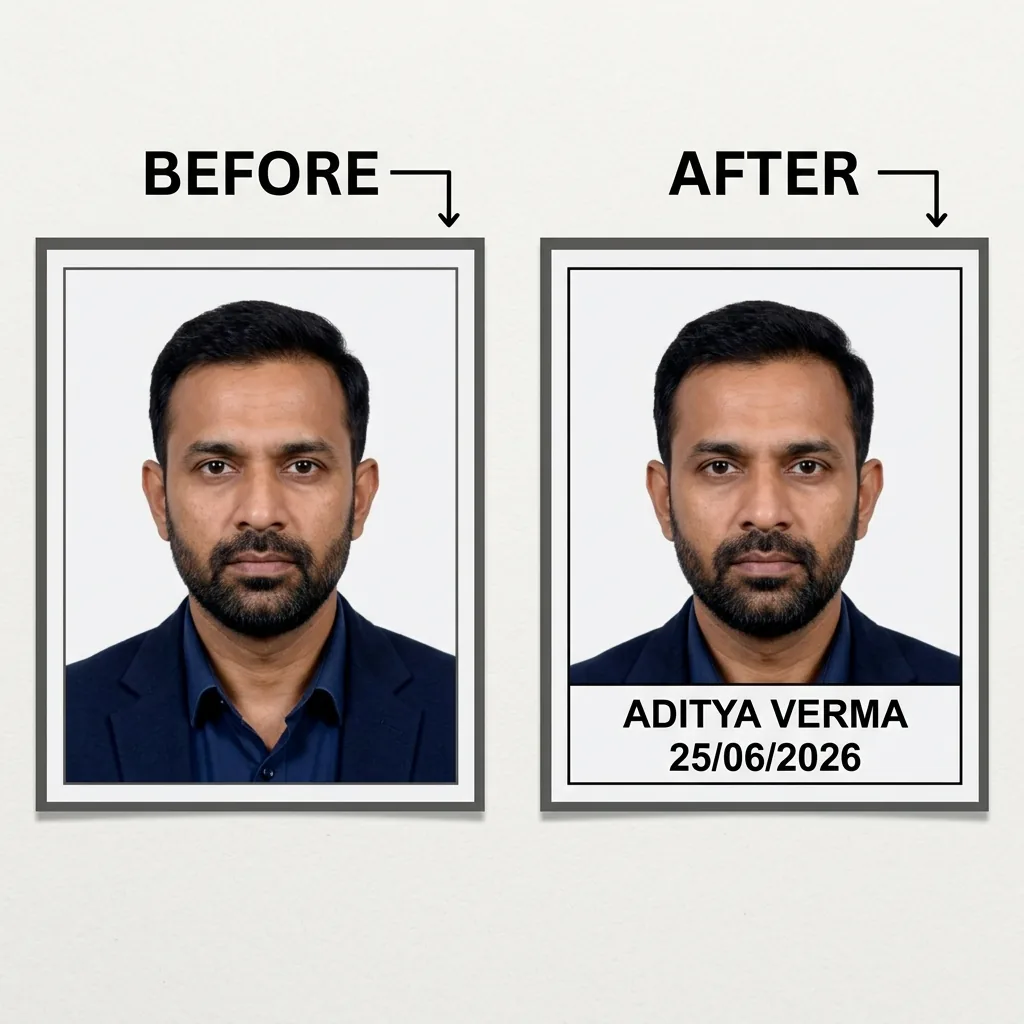
Before and after: what the digital tool changes
The name-and-date tool adds a separate light strip below the photo and prints the entered name and photography date on it. Use that output only for a form whose current instructions call for digital text, then recheck the finished file's dimensions and size against that form.
Which workflows use a strip, slate or neither
| Application | Current instruction | Authority source |
|---|---|---|
| APPSC Direct Recruitment OTPR | Digital name and photography date printed on the photo | APPSC OTPR user manual |
| Kerala PSC | Digital name and photography date at the bottom of the photo | Kerala PSC applicant guidance |
| Navy Agniveer | Physical black slate held in the photo; not a digital strip | Indian Navy Agniveer notice, paragraph 34 |
| Agniveervayu | Physical black slate held in the photo; not a digital strip | IAF Intake 01/2027 notice, paragraph 43.3.1 |
| UPSC | No strip listed; uploaded photo, live photo and triple signature | UPSC photo and signature instructions |
| SSC | No strip listed; photograph captured live in the application | SSC CHT 2026 notice, paragraphs 8.4–8.7 |
| IBPS | No strip listed; uploaded photo plus separate live photograph | IBPS CRP-SPL XVI notice, Annexure III |
Instructions can change by recruitment cycle. If a current notice does not mention a digital strip, do not infer one from an older guide or from another authority's form.
What a digital strip needs to contain
APPSC's Direct Recruitment OTPR manual says the photograph should have the candidate's name and the date it was taken printed on it. Kerala PSC says the name and photography date should be printed at the bottom. These sources do not create a universal font or date-format rule for other forms, so follow the current notice for the application you are preparing.
Why the workflows are easy to confuse
A digital strip and a slate photo both display a name and date, but they are not interchangeable. The strip is added to an existing image. A slate is a physical object held at chest level while the photograph is taken. UPSC's live-photo and triple-signature steps are different again and do not include either treatment.
How to prepare a digital strip when it is listed
For APPSC, Kerala PSC or another form that explicitly asks for digital text, the photo with name & date tool can add the strip on your device:
- Upload the photo you intend to use.
- Enter the candidate's name and the date the photograph was taken.
- Review the strip placement and export the JPG.
- Check the finished file against the current application instructions.
The tool runs in the browser, so the photo, name and date are not sent to the site's server. The SSC photo with name and date page explains why current SSC applications do not use this strip.
Then check the relevant file limits
After adding a strip for a supported workflow, compare the finished file with the registry-backed guidance for APPSC or Kerala PSC. For UPSC, use the UPSC requirements page and its linked instruction PDF instead of adding text.
Name-and-date troubleshooting
| Problem | What to check |
|---|---|
| The date is the application date | Replace it with the photography date when that is what the current notice requests. |
| The strip covers the face or shoulders | Re-crop with enough space, then regenerate the strip below the portrait. |
| Text becomes blurry after resizing | Avoid repeatedly saving the JPEG; export the strip once, then make only the required final adjustment. |
| The notice asks for a slate photo | Take a new photo with the physical slate present. Do not add a digital strip afterward. |
| The notice does not mention a name/date treatment | Leave the photo plain and follow the workflow described by that authority. |
For other measurable upload problems, see why exam photos and signatures get rejected. The final decision remains with the recruiting authority, so confirm the current notice before submitting.
Frequently asked questions
Does UPSC require the name and date to be printed on the photo?
No. UPSC's current instructions list a 20–200 KB JPG photo upload, mandatory live photograph capture, and one 20–100 KB image containing three signatures stacked vertically. They do not list a name-and-date strip.
What date should I put on a digital name-and-date strip?
Use the date the photograph was taken, but only when the current application instructions ask for that date. Do not substitute the application date unless the notice says to do so.
Which applications can use a digital name-and-date strip?
The current APPSC Direct Recruitment OTPR manual and Kerala PSC guidance require the candidate's name and photography date on the image. Confirm the notice for the specific recruitment before preparing it.
Should I add a digital strip for UPSC, SSC, IBPS, Navy Agniveer or Agniveervayu?
Not for the current SSC, IBPS or UPSC workflows. Navy Agniveer and Agniveervayu notices instead require the candidate to hold a physical black slate with the name and photography date when the photo is taken; a digital strip does not replace that slate.