
UPSC CSE, NDA and CDS all upload through the same UPSC OTR (One-Time Registration) portal, so they share one set of file rules. The part that trips most candidates is the signature: UPSC wants three signatures on a single sheet, not one. Whether you're preparing a Mains Detailed Application Form or planning for the next cycle, here are the file-size limits UPSC actually publishes and how to get both files right in one pass.
Quick answer
- Photo: 20–200 KB, JPG, plain white background, face covering about 75% of the frame. UPSC publishes no fixed pixel size, aspect ratio, or name/date strip.
- Signature: sign your name three times vertically on a single plain white sheet in black ink, then upload it as one 20–100 KB JPG.
- Before you apply: read the current notification — UPSC can add cycle-specific rules such as a photo-recency window.
- Upload at the UPSC OTR portal: upsconline.nic.in.
What are the UPSC CSE photo and signature specs for 2026?
UPSC CSE uses the same OTR (One-Time Registration) portal as NDA and CDS. The specs below are confirmed across the UPSC OTR portal instructions and the notification published by UPSC. Confirm the figures for your specific cycle before applying.
| Field | Photo | Signature |
|---|---|---|
| Format | JPG / JPEG only | JPG / JPEG only |
| File size | 20–200 KB | 20–100 KB |
| Pixel dimensions | No fixed size published | 350–500 px (three on one sheet) |
| Background | Plain white | White paper, clean |
| Name + date on image | Not required by UPSC | — |
| Face coverage | About 75% of frame | — |
| Recency | Per notification, if stated | — |
| Ink colour | — | Black (recommended) |
| Signature count | — | Three, written vertically on one sheet |
A note on the photo ceiling: some coaching sources cite 300 KB. UPSC's current OTR portal instructions publish a 20–200 KB photograph, so target 200 KB as the ceiling and confirm the figure in the official notification PDF at upsc.gov.in before applying.
Does UPSC CSE require a square photo, or name and date on it?
No. UPSC's instructions publish no fixed photo pixel size and no aspect ratio, so the instructions do not impose a square crop. They also do not ask for a name-and-date strip on the image. What UPSC does specify is the file format (JPG), the 20–200 KB size band, a plain white background, and a face covering about 75% of the frame. If a future notification adds a requirement, follow the notification.
Why does UPSC CSE require three signatures — and how do you prepare them?
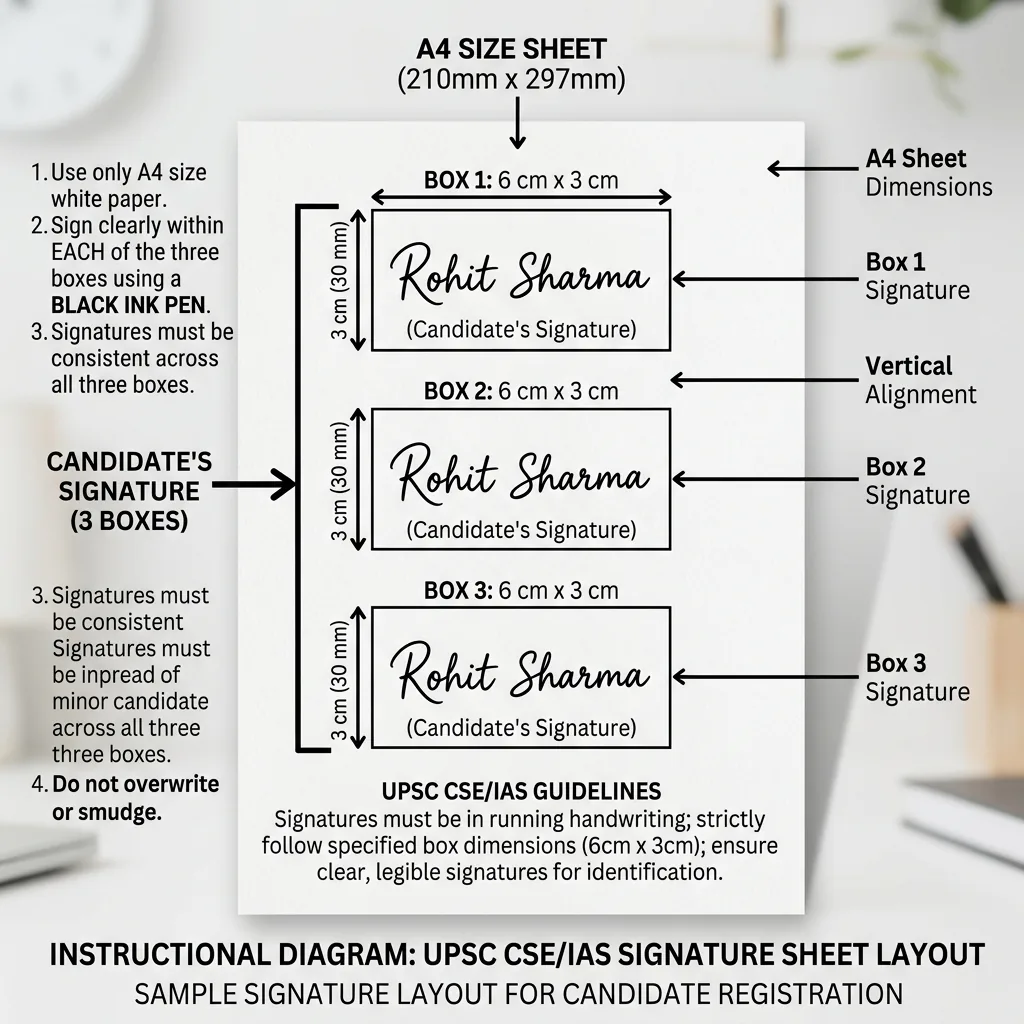
UPSC requires candidates to write their signature three times on a single sheet of white paper, with the three signatures arranged vertically, one below the other. You photograph or scan this one sheet and upload it as a single image file. All three must be in black ink, cursive or running hand, and consistent with each other. The portal does not accept three separate files.
UPSC uses all three as verification references throughout the selection process — at the examination hall, document verification, and the medical board. Signatures that look very different from each other get flagged. Prepare them in one sitting so the style is consistent.
- Paper: plain white A4, no lines, no watermarks.
- Sign three times vertically in black ink, cursive hand, with a small gap — roughly 4–5 cm per signature — between each.
- Photograph flat in even overhead light. Check that no shadow falls across any of the three signatures.
- Upload the single image through the UPSC signature resizer. It cleans the paper background and outputs a JPG inside the 20–100 KB band.
How does UPSC CSE compare to NDA and CDS for photo requirements?
All three use the same UPSC OTR portal, so the file rules are the same. Any differences come from cycle-specific rules in each notification:
| Requirement | CSE (IAS) | NDA | CDS |
|---|---|---|---|
| Photo file size | 20–200 KB | 20–200 KB | 20–200 KB |
| Signature file size | 20–100 KB | 20–100 KB | 20–100 KB |
| Fixed pixel size | None published | None published | None published |
| Recency rule | Per notification | Per notification | Per notification |
| Signature count | Three (one sheet) | One | One |
| Ink colour | Black (recommended) | Black or blue | Black or blue |
The safe habit for a cross-applicant is to take a fresh photo for each application rather than reuse an old file, since a notification may set its own recency window. For the full NDA and CDS photo guide, see the NDA & CDS photo and signature guide.
What are the most common UPSC CSE photo rejection reasons?
The UPSC portal returns a generic error without naming the failed check. These are the causes most worth eliminating before uploading:
| Rejection cause | The fix |
|---|---|
| File above 200 KB | Compress with the UPSC photo resizer — most phone photos are 2–5 MB |
| File below 20 KB | The resizer targets the full 20–200 KB band; compressing to a tiny size fails the floor check |
| Non-white background | Use the white background tool first, then resize |
| Face too small in frame | Recrop so the face covers about 75% of the frame before resizing |
| Signature: fewer than three / inconsistent style | Write all three on one sheet in one sitting — same ink, same style, consistent size; photograph as one image |
For the full breakdown of rejection patterns across all Indian exam portals, see why exam photos and signatures get rejected.
How to prepare your UPSC CSE photo and signature — complete workflow
For the photo, in this order:
- Take a fresh photo: plain white wall, formal attire, face filling about 75% of the frame.
- Resize for UPSC. Run the image through the UPSC photo resizer. It outputs a JPG inside the 20–200 KB band on a clean white background.
- Save as
photo.jpg. The UPSC portal expects this filename.
For the signature:
- Sign three times vertically on a single plain white A4 sheet in black ink, cursive hand, with even spacing between each.
- Photograph flat in even light; no shadow should fall across any of the three signatures.
- Run through the UPSC signature resizer. It cleans the background and compresses to the 20–100 KB band. Nothing leaves your browser.
For UPSC-specific requirement details and links to the official notification PDFs, see the exam requirements directory. For a side-by-side comparison of all major exam specs, see the photo and signature size guide for all exams.
Frequently asked questions
Is the UPSC CSE photo size the same as NDA and CDS?
Yes — all three use the same UPSC OTR portal: a 20–200 KB JPG photo on a plain white background with about 75% face coverage, plus a three-signature sheet at 20–100 KB. UPSC publishes no fixed pixel size, no square requirement, and no name/date strip. Any recency window is set per notification, so read the one for your cycle.
Why does UPSC CSE require three signatures?
UPSC uses all three signatures as identity verification references throughout the selection process — at the examination hall, document verification, and the medical board. Write all three on a single plain white sheet in black ink, arranged vertically. Upload the one image file containing all three.
Does UPSC require a square photo or a name-and-date strip?
No. UPSC's instructions publish no fixed pixel dimensions and no aspect ratio, so a normal passport-style portrait is fine — there is no square-crop rule — and they do not ask for a name or date printed on the image. UPSC specifies the JPG format, the 20–200 KB size band, a plain white background, and roughly 75% face coverage.
Can I reuse my Prelims photo for the UPSC Mains DAF?
The Mains Detailed Application Form requires a photo that matches your Prelims application photo and your current appearance. If your appearance has changed since the Prelims application, take a fresh photo. Confirm the exact DAF photo requirements in the official UPSC Mains notification at upsc.gov.in.
My UPSC CSE photo is 220 KB — will it be accepted?
No — 220 KB is over the ceiling. UPSC's current OTR portal instructions set a 20–200 KB band for the photo, so compress to 200 KB or below. Some older coaching-site guides cite 300 KB; treat the official notification as authoritative and confirm before submitting.