Passport, exam and document photos, ready for Indian forms
Free tools that work inside your browser. Drop a photo to bring it under a form's KB limit, or pick your exam.
We resize it to an exact KB size in your browser — nothing is uploaded.
Drop a photo, or click to browse
JPG, PNG or HEIC — a clear, front-facing photo works best
JPG · PNG · WebP · HEIC
Sizes taken from what each authority publishes
Prepare application photos & documents using published specs
Pick your path. Each requirement page links the official source and says when a figure is not from one.
Exam & Government
Exam & Government Applications
Photo and signature sizes for 11 Indian exam, recruitment and ID forms. Each page links the authority's own notice and gives the date it was checked.
Find your exam or formPassport & Visa
Passport & Visa Photos
Passport and visa photo sizes for 9 countries and regions, with the background each one asks for and a link to where the rule comes from.
Make a passport or visa photoDocument Utilities
Document Utilities
15 free tools to resize, compress, clean up and sign photos and signatures.
Open all toolsPopular tasks
What do you need to get done?
Passport & Visa Photo
Start from a clear front-facing photo taken from a little distance. The maker crops it to your country's size and head height and sets a plain background, then you check it before downloading.
Exam Application Kit
Pick your exam and prepare each file its form asks for — SSC, UPSC, Railway, Banking and more.
Signature Tools
Turn a paper signature into a clean, transparent PNG that's ready to drop into any form.
Image Processing
Compress a photo under a KB limit, give it a plain white background or change its DPI.
ID Photos
Photo and signature sizes for PAN, voter ID and driving licence applications, each with a link to the official source.
Common Mistakes
Why photos get rejected
Most returned photos fail on something you can see or measure. easyPhoto measures the file exactly and estimates the face, background and lighting, so you can fix a problem before you submit.
Common reasons for rejection
Wrong head size
Incorrect background
Poor lighting
Face not centered
Wrong dimensions
Eyes not visible
Automated photo checks
An estimate can only warn. Eyes, glare and expression are for you to check.
Example: the sample photo
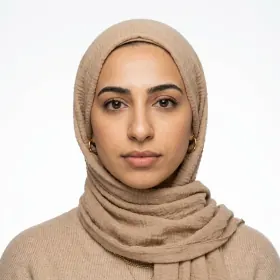
No issues found
Example result for the sample photo above
Check your own photo against the size your form lists. The result shows which parts were measured and which are estimates.
Check a photoAutomated photo preparation
Automated checks for measurable details
From an everyday photo to one cropped and sized for the document you pick.Example walkthrough below, shown with a sample photo.
Original photo
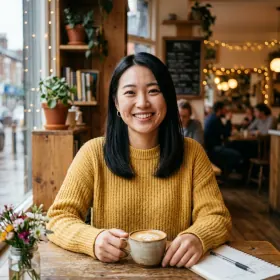
- 1
Busy Background
Background not plain
- 2
Uneven Lighting
Shadows on face
- 3
Face Not Centered
Not aligned properly
- 4
Wrong Size & Ratio
Incorrect crop & ratio
Automated photo checks
- DimensionsMeasured
- Head sizeEstimate
- Face centredEstimate
- Eye lineEstimate
- BackgroundEstimate
- LightingEstimate
Example: no warnings on the sample photo
Size is measured exactly. The other rows are estimates: they can warn you, not approve the photo.
Prepared photo

Sized to the document you pick
The millimetre size and background come from that document's published rule. The authority still makes the decision.
Add a photo
A clear front-facing photo, taken from a little distance
Automatic crop
Cropped and sized to the document you picked
Read warnings
Retake if a warning points to blur, shadow or tilt
Download
Open the file and compare it with your form
Popular Countries
View all countries
India
Passport · Visa · ID
USA
Passport · Visa
UK
Passport · Visa
Canada
Passport · Visa
More countries
 Australia
 UAE
 Pakistan
 Nepal
All tools at your fingertips
Passport Photo Maker
Country sizes with published sources
Visa Photo Maker
Visa photo sizes by country
Baby Passport Photo
Under-4 passport print rules
Resume / CV Photo
Job applications & CVs
Pre-submission Check
Check photo + signature before you submit
Aadhaar Photo
How the Aadhaar photo gets changed
Guides to the rules
What each authority actually publishes, traced to the notice it came from — and what it does not publish, said plainly.
July 4, 2026 · 8 min read
Indian Government ID Photo Size 2026: PAN, Voter ID, DL & Aadhaar
PAN, voter ID, Aadhaar and driving-licence applications each set their own photo rules. Compare the limits each portal publishes before you prepare a file.
June 21, 2026 · 10 min read
How to Prepare Documents for Online Exam Applications in India
A checklist for the four uploads most exam forms ask for: photo, signature, certificate PDFs and a masked Aadhaar.
June 23, 2026 · 7 min read
PAN Card Photo Size: Exact Dimensions, KB Limit & Signature Spec (NSDL / UTIITSL)
Protean (NSDL) and UTIITSL publish different PAN photo and signature sizes. Here are both side by side, and which one your route needs.
June 25, 2026 · 6 min read
How to Print Passport Photos at Home — Sheet Layout, DPI & Paper Guide
Printing passport photos at home comes down to a correctly cropped image, photo paper, and 'fit to page' switched off so each photo prints at its real size.
July 22, 2026 · 5 min read
SIR Form Photo Size 2026 — What the ECI Actually Requires
The online SIR enumeration form has no photo upload and the ECI publishes no SIR photo size. Here is what the form asks for, and when a voter photo does apply.
June 24, 2026 · 6 min read
Indian Passport Photo Rules 2026: Adults vs Children Under 4
Ordinary adults do not upload or carry a passport photo to a PSK/POPSK: it is captured at the centre. The 35×45 mm white-background print is the below-four exception.
Why your photos stay private
A server-based editor sends documents away from your device. easyPhoto instead runs the editing steps inside your browser, so the selected photos and IDs are not uploaded to an easyPhoto server.
Edited on your device
Cropping, background removal and compression run in your browser. Your photo is not sent to a server.
Gone when you close the tab
Your photo is held only in the open tab. Closing or refreshing it clears the photo.
No account
No sign-up, email or login. Open a tool and start.
Counts, not content
We count page visits and tool use without cookies. The counts never include your photo or anything you type.
Frequently asked questions
Is it really free? Is there a watermark?
Yes, it is free, with no watermark and no sign-up. You download the full-quality file. Optional tips help pay for the site, which will also carry ads.
What can the photo checks confirm?
Pixel size, file size and format are measured exactly. Head size, face position, background and lighting are estimates that can warn you about a likely problem. Neither kind of check can tell you whether the authority will accept the photo, so compare the result with the current application instructions before submitting.
Why isn't the background plain white for the UK and Schengen?
For a Schengen visa the shade is set by the consulate handling your application, so easyPhoto starts with light grey and you can change it. For a UK passport, HM Passport Office accepts any plain light background and names cream, ivory, vanilla and light grey among its examples; easyPhoto starts with a light cream. In both cases the starting shade is easyPhoto's choice, not a rule.
What photo should I use?
A recent photo taken from about two metres away, facing the camera, in even light, with a neutral expression and your whole head and the top of your shoulders in the frame. Arm's-length selfies distort the face and leave too little room to crop.
Can I use one photo for printing and for an online form?
Usually, yes. The passport and visa makers give a file at the printed millimetre size for a photo lab, and the resize tools bring a copy under a form's KB limit. Some applications, such as an adult Indian passport at a PSK, take the photo at the counter, so check what yours asks for first.