
"Just use a white wall" is the most common piece of bad passport-photo advice. White is correct for some countries and explicitly wrong for others, and the wrong shade is one of the top reasons photos get rejected. Here's the right background color for each major country, and how to apply it.
Quick answer
- White / off-white: US, Canada and Australia; India's under-four print and overseas ICAO guidance use white.
- Any plain light colour: the UK — HM Passport Office names shades of white, cream, ivory and light grey among its acceptable examples.
- Light grey: safest for Schengen (Switzerland rejects white).
- Whatever the colour, it must be a single even tone with no shadows.
India: white
White applies to the under-four print and overseas ICAO guidance.
UK: light cream
Light cream matches the recorded UK options.
UK on white
Acceptable — HM Passport Office names shades of white among its light-background examples.
Patterned wall
Patterns prevent a plain, uniform background.
Background shadow
A shadow makes the background uneven.
Uneven lighting
A gradient across the face is not even lighting.
Before and after: what actually changes
easyPhoto's background tool replaces the background while keeping your canvas dimensions fixed—select white and a 1024 × 1024 px photo stays 1024 × 1024 px, with only the background changed. For an actual application, the next step is country-specific cropping—for example, India's under-four print frame is 35 × 45 mm, while the U.S. frame is 2 × 2 inches (51 × 51 mm).
Background color by country
| Country | Background | Spec |
|---|---|---|
| United States | Plain white or off-white | View → |
| India (under-four print / overseas) | Plain white | View → |
| United Kingdom | Any plain light colour, white included | View → |
| Canada | Plain white | View → |
| Australia | Plain white or light grey | View → |
| Schengen (EU) | Light grey safest (varies by country) | View → |
Official sources: U.S. Dept. of State, Passport Seva under-four guidance, GOV.UK.
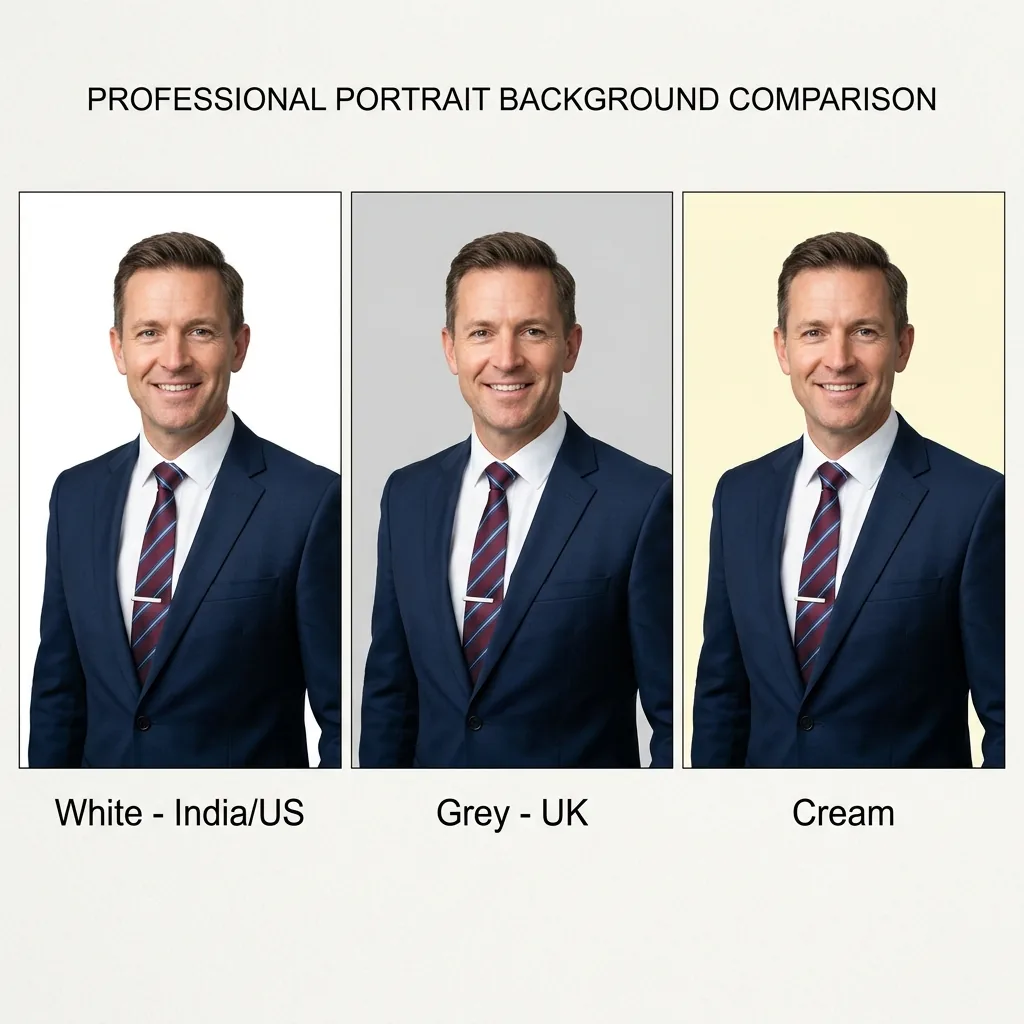
Why the shade matters so much
Passport backgrounds must be a single, even tone with no shadows, gradients or texture so that facial-recognition systems can separate your head from the background. A "white" wall photographed in warm indoor light often comes out cream or grey anyway. And a real shadow behind your head reads as a non-uniform background. Both fail.
The shadow problem
Standing too close to the wall throws a shadow that ruins an otherwise good photo. Step half a metre forward and light yourself evenly from the front (a window works well). If a faint shadow remains, replacing the background entirely is the cleanest fix.
How to set the exact background
You don't need a perfect wall. Upload your photo to the passport photo maker and pick your country. It applies that country's correct background color automatically, so you never have to remember whether it's white, grey or cream. To put any photo on a clean white background directly, use the white background tool; to drop the background out completely first, try the background remover. For lighting, framing and setup tips when shooting at home, see how to take a passport photo at home.
One more check before you submit
After setting the background, make sure the photo still meets the size and head-proportion rules (see passport photo size by country), then compress it to your portal's file limit with resize to an exact KB. Everything runs locally, so your photo never leaves your device.
Background troubleshooting
| Problem | Fix |
|---|---|
| Grey halo around hair or shoulders | Use a sharper, evenly lit source with clear separation from the original background; inspect edges before download. |
| White chosen for a UK photo | Switch to the plain light-grey or cream option required by GOV.UK guidance. |
| Face or clothing disappears into the new background | Retake with contrasting clothing and even front lighting; background replacement cannot restore missing edges. |
| Correct colour but wrong crop | Choose the country maker after replacement so the final frame and head size match that country's requirement. |
Frequently asked questions
Can I use a plain white wall for my passport photo?
Only when the relevant authority requires white. The US uses white or off-white; India's under-four print and overseas ICAO guidance use white. Check the current document-specific source before applying.
What background colour does a US or India passport photo need?
The US uses plain white or off-white. India's under-four print and overseas ICAO guidance use plain white; ordinary adult domestic applicants are photographed at the PSK/POPSK.
Does a UK passport photo background have to be grey?
HM Passport Office asks for a plain background in any light colour and gives shades of white, cream, ivory and light grey as its own examples, so white is acceptable. Light grey is still a sensible default because it keeps your outline visible against a pale top, but it is not a requirement.
How do I remove a shadow behind my head?
Step about half a metre away from the wall and light yourself evenly from the front (a window works). If a faint shadow remains, replace the background entirely with the white-background tool or background remover.